Simulating and Fitting a Gaussian Mixture Model
This tutorial demonstrates how to use StateSpaceDynamics.jl to create a Gaussian Mixture Model (GMM) and fit it using the EM algorithm. Unlike Hidden Markov Models which model temporal sequences, GMMs are designed for clustering and density estimation of independent observations. Each data point is assumed to come from one of several Gaussian components, but there's no temporal dependence.
GMMs are fundamental in machine learning for unsupervised clustering, density estimation, anomaly detection, and as building blocks for more complex models. The key insight is that complex data distributions can often be well-approximated as mixtures of simpler Gaussian distributions, each representing a different "mode" or cluster in the data.
Load Required Packages
using StateSpaceDynamics
using LinearAlgebra
using Random
using Plots
using StableRNGs
using Distributions
using StatsPlots
using Combinatorics
using LaTeXStrings
Set up reproducible random number generation
rng = StableRNG(1234);Create a True Gaussian Mixture Model
We'll create a "ground truth" GMM with known parameters, generate data from it, then see how well we can recover these parameters using only the observed data.
k = 3  # Number of mixture components (clusters)
D = 2 # Data dimensionality (2D for easy visualization)2Define the true component means: $\boldsymbol{\mu}_i \in \mathbb{R}^D$ for $i = 1, \ldots, k$ Each column represents the mean vector $\boldsymbol{\mu}_i$ for one component
true_μs = [
    -1.0  1.0  0.0;   # $x_1$ coordinates of the 3 component centers
    -1.0 -1.5  2.0    # $x_2$ coordinates of the 3 component centers
];  # Shape: $(D, k) = (2, 3)$
Define covariance matrices $\boldsymbol{\Sigma}_i$ for each component Using isotropic (spherical) covariances for simplicity
true_Σs = [Matrix{Float64}(0.3 * I(2)) for _ in 1:k];Define mixing weights $\pi_i$ (must sum to 1) These represent $P(\text{component} = i)$ for a random sample
true_πs = [0.5, 0.2, 0.3]; # Component 1 most likely, component 2 least likelyConstruct the complete GMM
true_gmm = GaussianMixtureModel(k, true_μs, true_Σs, true_πs);

print("Created GMM: $k components, $D dimensions\n")
for i in 1:k
    print("Component $i: μ = $(true_μs[:, i]), π = $(true_πs[i])\n")
end
Created GMM: 3 components, 2 dimensions
Component 1: μ = [-1.0, -1.0], π = 0.5
Component 2: μ = [1.0, -1.5], π = 0.2
Component 3: μ = [0.0, 2.0], π = 0.3Sample Data from the True GMM
Generate synthetic data from our true model. We'll sample both component assignments (for evaluation) and the actual observations.
n = 500 # Number of data points to generate500Determine which component each sample comes from
labels = rand(rng, Categorical(true_πs), n);Count samples per component for verification
component_counts = [sum(labels .== i) for i in 1:k]
print("Samples per component: $(component_counts) (expected: $(round.(n .* true_πs)))\n");
Samples per component: [252, 96, 152] (expected: [250.0, 100.0, 150.0])Generate the actual data points
X = Matrix{Float64}(undef, D, n)
for i in 1:n
    component = labels[i]
    X[:, i] = rand(rng, MvNormal(true_μs[:, component], true_Σs[component]))
end
Visualize the generated data colored by true component membership
p1 = scatter(X[1, :], X[2, :];
    group=labels,
    title="True GMM Components",
    xlabel=L"x_1", ylabel=L"x_2",
    markersize=4,
    alpha=0.7,
    palette=:Set1_3,
    legend=:topright
)

for i in 1:k
    scatter!(p1, [true_μs[1, i]], [true_μs[2, i]];
        marker=:star, markersize=10, color=i,
        markerstrokewidth=2, markerstrokecolor=:black,
        label="")
end

p1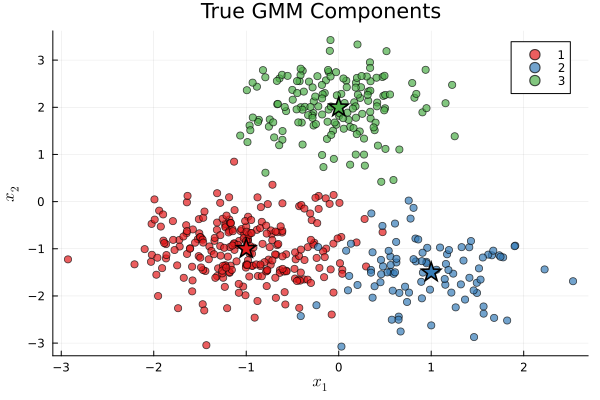
Fit GMM Using EM Algorithm
Now we simulate the realistic scenario: observe only data points $\mathbf{X}$, not the true component labels or parameters. Our goal is to recover the underlying mixture structure using EM.
Initialize a GMM with correct number of components but unknown parameters
fit_gmm = GaussianMixtureModel(k, D)

print("Running EM algorithm...")
Running EM algorithm...Fit the model using EM algorithm
class_probabilities, lls = fit!(fit_gmm, X;
    maxiter=100,
    tol=1e-6,
    initialize_kmeans=true  # K-means initialization helps convergence
);

print("EM converged in $(length(lls)) iterations\n")
print("Log-likelihood improved by $(round(lls[end] - lls[1], digits=1))\n");
Iteration 1: Log-likelihood = -1345.7693473044374
Iteration 2: Log-likelihood = -1334.1415983637835
Iteration 3: Log-likelihood = -1331.3486310717828
Iteration 4: Log-likelihood = -1329.9579736388114
Iteration 5: Log-likelihood = -1328.9817810270047
Iteration 6: Log-likelihood = -1328.2041729412545
Iteration 7: Log-likelihood = -1327.576851383513
Iteration 8: Log-likelihood = -1327.0788017593352
Iteration 9: Log-likelihood = -1326.6911307933235
Iteration 10: Log-likelihood = -1326.3938695912282
Iteration 11: Log-likelihood = -1326.1676609948302
Iteration 12: Log-likelihood = -1325.9956676478246
Iteration 13: Log-likelihood = -1325.8643787445947
Iteration 14: Log-likelihood = -1325.7634827488437
Iteration 15: Log-likelihood = -1325.6853161758074
Iteration 16: Log-likelihood = -1325.6242447393995
Iteration 17: Log-likelihood = -1325.5761309727206
Iteration 18: Log-likelihood = -1325.5379237185814
Iteration 19: Log-likelihood = -1325.5073570155078
Iteration 20: Log-likelihood = -1325.48273392374
Iteration 21: Log-likelihood = -1325.4627723825147
Iteration 22: Log-likelihood = -1325.4464951938214
Iteration 23: Log-likelihood = -1325.4331511047303
Iteration 24: Log-likelihood = -1325.4221577933401
Iteration 25: Log-likelihood = -1325.4130603433962
Iteration 26: Log-likelihood = -1325.4055007412787
Iteration 27: Log-likelihood = -1325.399195276764
Iteration 28: Log-likelihood = -1325.3939176575725
Iteration 29: Log-likelihood = -1325.3894862891636
Iteration 30: Log-likelihood = -1325.3857546161594
Iteration 31: Log-likelihood = -1325.3826037326694
Iteration 32: Log-likelihood = -1325.3799366873325
Iteration 33: Log-likelihood = -1325.377674064011
Iteration 34: Log-likelihood = -1325.3757505296953
Iteration 35: Log-likelihood = -1325.37411212106
Iteration 36: Log-likelihood = -1325.37271409887
Iteration 37: Log-likelihood = -1325.371519241839
Iteration 38: Log-likelihood = -1325.3704964826072
Iteration 39: Log-likelihood = -1325.369619811744
Iteration 40: Log-likelihood = -1325.3688673928407
Iteration 41: Log-likelihood = -1325.3682208447694
Iteration 42: Log-likelihood = -1325.367664657052
Iteration 43: Log-likelihood = -1325.367185711653
Iteration 44: Log-likelihood = -1325.366772890387
Iteration 45: Log-likelihood = -1325.3664167513546
Iteration 46: Log-likelihood = -1325.3661092614095
Iteration 47: Log-likelihood = -1325.3658435742195
Iteration 48: Log-likelihood = -1325.365613845561
Iteration 49: Log-likelihood = -1325.3654150791906
Iteration 50: Log-likelihood = -1325.3652429978515
Iteration 51: Log-likelihood = -1325.3650939350534
Iteration 52: Log-likelihood = -1325.3649647440518
Iteration 53: Log-likelihood = -1325.3648527211187
Iteration 54: Log-likelihood = -1325.3647555407322
Iteration 55: Log-likelihood = -1325.3646712007055
Iteration 56: Log-likelihood = -1325.3645979756482
Iteration 57: Log-likelihood = -1325.3645343774335
Iteration 58: Log-likelihood = -1325.3644791215488
Iteration 59: Log-likelihood = -1325.3644310984082
Iteration 60: Log-likelihood = -1325.3643893488677
Iteration 61: Log-likelihood = -1325.364353043289
Iteration 62: Log-likelihood = -1325.3643214636224
Iteration 63: Log-likelihood = -1325.3642939880433
Iteration 64: Log-likelihood = -1325.3642700777752
Iteration 65: Log-likelihood = -1325.364249265775
Iteration 66: Log-likelihood = -1325.3642311469832
Iteration 67: Log-likelihood = -1325.3642153699566
Iteration 68: Log-likelihood = -1325.364201629651
Iteration 69: Log-likelihood = -1325.3641896611837
Iteration 70: Log-likelihood = -1325.3641792344872
Iteration 71: Log-likelihood = -1325.3641701496447
Iteration 72: Log-likelihood = -1325.3641622328946
Iteration 73: Log-likelihood = -1325.3641553331786
Iteration 74: Log-likelihood = -1325.3641493191183
Iteration 75: Log-likelihood = -1325.3641440764397
Iteration 76: Log-likelihood = -1325.3641395057118
Iteration 77: Log-likelihood = -1325.3641355204124
Iteration 78: Log-likelihood = -1325.3641320452202
Iteration 79: Log-likelihood = -1325.364129014569
Iteration 80: Log-likelihood = -1325.364126371363
Iteration 81: Log-likelihood = -1325.36412406588
Iteration 82: Log-likelihood = -1325.364122054807
Iteration 83: Log-likelihood = -1325.3641203004127
Iteration 84: Log-likelihood = -1325.3641187698288
Iteration 85: Log-likelihood = -1325.364117434399
Iteration 86: Log-likelihood = -1325.3641162691733
Iteration 87: Log-likelihood = -1325.3641152523765
Iteration 88: Log-likelihood = -1325.3641143650505
Converged at iteration 88
EM converged in 88 iterations
Log-likelihood improved by 20.4Plot EM convergence
p2 = plot(lls, xlabel="EM Iteration", ylabel="Log-Likelihood",
          title="EM Algorithm Convergence", legend=false,
          marker=:circle, markersize=3, lw=2, color=:darkblue)

if length(lls) < 100
    annotate!(p2, length(lls)*0.7, lls[end]*0.95,
        text("Converged in $(length(lls)) iterations", 10)) # Add convergence annotation
end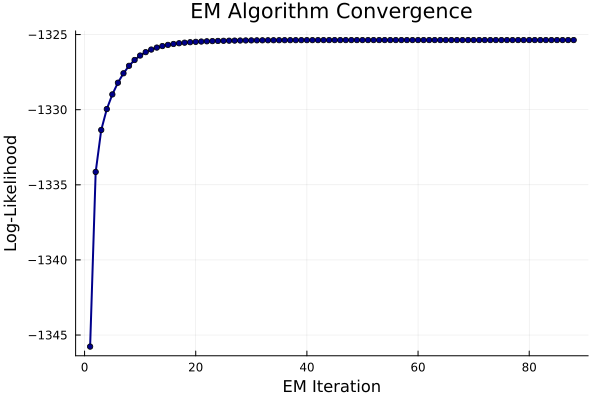
Visualize Fitted Model
Create visualization showing both data and fitted GMM with probability contours. Create grid for plotting contours
x_range = range(extrema(X[1, :])..., length=100)
y_range = range(extrema(X[2, :])..., length=100)
xs = collect(x_range)
ys = collect(y_range)

p3 = scatter(X[1, :], X[2, :];
    markersize=3,
    alpha=0.5,
    color=:gray,
    xlabel=L"x_1",
    ylabel=L"x_2",
    title="Fitted GMM Components",
    legend=:topright,
    label="Data points"
)

p3

colors = [:red, :green, :blue] # Plot probability density contours for each learned component
for i in 1:fit_gmm.k
    comp_dist = MvNormal(fit_gmm.μₖ[:, i], fit_gmm.Σₖ[i])
    Z_i = [fit_gmm.πₖ[i] * pdf(comp_dist, [x, y]) for y in ys, x in xs]

    contour!(p3, xs, ys, Z_i;
        levels=6,
        linewidth=2,
        c=colors[i],
        label="Component $i (π=$(round(fit_gmm.πₖ[i], digits=2)))"
    )

    scatter!(p3, [fit_gmm.μₖ[1, i]], [fit_gmm.μₖ[2, i]];
        marker=:star, markersize=8, color=colors[i],
        markerstrokewidth=2, markerstrokecolor=:black,
        label="")
end
Component Assignment Analysis
Use fitted model to assign each data point to its most likely component and compare with true assignments.
Get posterior probabilities: $P(\text{component } i | \mathbf{x}_j)$
predicted_labels = [argmax(class_probabilities[:, j]) for j in 1:n];Calculate assignment accuracy (accounting for possible label permutation) Since EM can converge with components in different order
function best_permutation_accuracy(true_labels, pred_labels, k)
    best_acc = 0.0
    best_perm = collect(1:k)

    for perm in Combinatorics.permutations(1:k)
        mapped_pred = [perm[pred_labels[i]] for i in 1:length(pred_labels)]
        acc = mean(true_labels .== mapped_pred)
        if acc > best_acc
            best_acc = acc
            best_perm = perm
        end
    end

    return best_acc, best_perm
end

accuracy, best_perm = best_permutation_accuracy(labels, predicted_labels, k)
print("Component assignment accuracy: $(round(accuracy*100, digits=1))%\n");
Component assignment accuracy: 97.0%Final Comparison Visualization
Side-by-side comparison of true vs learned component assignments
p_true = scatter(X[1, :], X[2, :]; group=labels, title="True Components",
                xlabel=L"x_1", ylabel=L"x_2", markersize=3, alpha=0.7,
                palette=:Set1_3, legend=false)

remapped_predicted = [best_perm[predicted_labels[i]] for i in 1:n] # Apply best permutation to predicted labels for fair comparison
p_learned = scatter(X[1, :], X[2, :]; group=remapped_predicted, title="Learned Components",
                   xlabel=L"x_1", ylabel=L"x_2", markersize=3, alpha=0.7,
                   palette=:Set1_3, legend=false)

p4 = plot(p_true, p_learned, layout=(1, 2), size=(800, 350))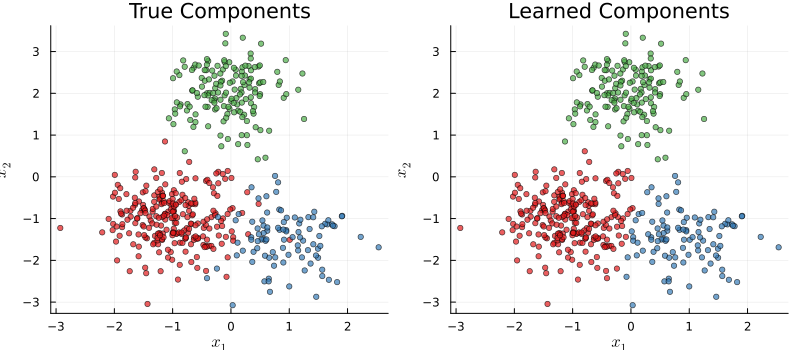
Summary
This tutorial demonstrated the complete Gaussian Mixture Model workflow:
Key Concepts:
- Mixture modeling: Complex distributions as weighted combinations of simpler Gaussians
- EM algorithm: Iterative parameter learning via expectation-maximization
- Soft clustering: Probabilistic component assignments rather than hard clusters
- Label permutation: Handling component identifiability issues
Applications:
- Unsupervised clustering and density estimation
- Anomaly detection via likelihood thresholding
- Dimensionality reduction (when extended to factor analysis)
- Building blocks for more complex probabilistic models
Technical Insights:
- K-means initialization significantly improves EM convergence
- Log-likelihood monitoring ensures proper algorithm behavior
- Parameter recovery quality depends on component separation and sample size
GMMs provide a flexible, interpretable framework for modeling heterogeneous data with multiple underlying modes or clusters, forming the foundation for many advanced machine learning techniques.
This page was generated using Literate.jl.